Beatmaker finger-drumming on a pad controller in a colorful studio
Sample vs. XO · updated August 27, 2026

Find any sound—or build drum beats?

For finding the right sound across a real-world audio library, Sample is the clear choice. XO is better treated as a specialized drum instrument: its strength is mapping one-shots and building beats, not translating any sound in your head into a result.

Any descriptionYour whole libraryCreative refinementMinimal interface
Any soundsearch drums, vocals, loops, instruments, ambience, foley, effects, textures, and more
Any wordsbe literal, emotional, technical, specific, vague, or wildly imaginative
4 directionsdescribe, find similar, find a complement, or blend two references
$0 / monthone-time purchase, local analysis, and offline use after activation
The short answer

For finding samples, choose Sample.

Sample wins the comparison for producers whose bottleneck is finding the right sound. It understands a description, searches the audio across your whole library, and lets one promising result lead to the next. XO wins a narrower decision: choose it when you specifically want a drum-map plugin with a built-in sequencer.

The products overlap on drum discovery, but they are not solving the same-size problem. XO organizes a universe of drum one-shots. Sample makes your entire local audio library searchable by intent.

Sample keeps the conversation going until the sound is right.

Search is not a one-shot command. Each result becomes another creative direction without sending you back into folders.

“ ”

1. Say what you hear

Type “soft felt piano, close mic, worn tape, hopeful but unresolved” or simply “huge dark impact.” Sample searches meaning and sound together.

↗

2. Start from almost right

Open any promising result and find sounds that share its sonic character—even when their filenames, packs, and folders have nothing in common.

±

3. Ask for more or less

Keep the reference but steer toward more organic, less harsh, shorter, heavier, airier, or a different instrument. Control how strongly the words reshape the result.

A+B

4. Create the next idea

Find a sound that complements the reference, or blend two references to search for the body of one and the texture of another.

Explore Blend →
Refine without restarting

The first good result is a doorway, not the finish line.

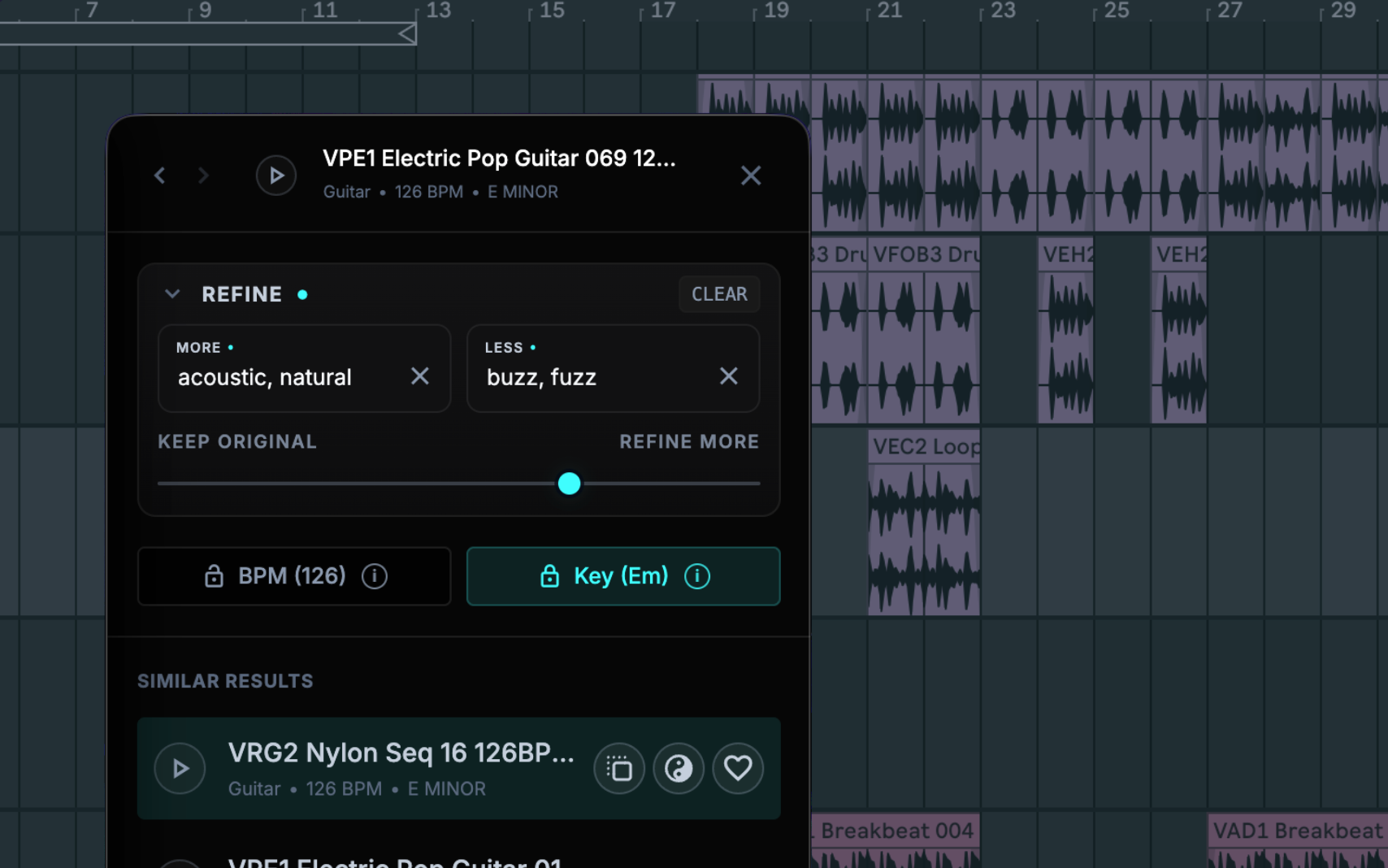
This is where Sample becomes more than a faster browser. A reference can stay recognizable while you change the qualities around it, move to another instrument, look for the layer that belongs beside it, or blend it with a second idea.

Actual Sample refine interface showing a reference waveform and controls for steering sound results
Sample’s actual Refine view: interactive waveforms, useful musical context, and the controls needed to keep moving—without turning the browser into another production environment.

A simple interface is a production feature.

Sample is designed to disappear into the session: ask, listen, adjust, drag, and return to the music.

⌕

No vocabulary lesson

You do not need to remember a filename, reconstruct a folder path, or guess which tag somebody else chose. Use the language already in your head.

〰

Hear the answer quickly

Responsive rows and interactive waveforms keep auditioning direct. The view stays useful when it is wide on a studio display or compact beside the DAW.

↗

Leave as soon as you find it

Sample is not trying to keep you inside an ecosystem. Drag or copy the audio into any DAW and continue producing.

The difference gets bigger in real sessions.

Finding sounds is rarely an isolated admin task. It happens while an idea, a collaborator, or a client is waiting.

In the room

Turn client language into options

When someone asks for “a tighter kick, less electronic, with a little room,” search that thought directly and audition alternatives while the conversation is still alive.

Across projects

Recall a sound without recalling its name

Describe the vocal texture, impact, loop, or field recording you used months ago. Sample searches what it sounds like—not just what the file was called.

Inside the arrangement

Ask what should come next

Similarity finds another version. Refinement changes the direction. Complement looks for support. Blend combines the useful character of two references. The library becomes a source of ideas, not merely storage.

Sample vs. XO, feature by feature.

The important distinction is scope: Sample is built to find the right sound; XO is built to explore drum one-shots and turn them into beats.

What mattersSampleXO
The question it answers
“What sound am I hearing in my head?”
“Which drum hit or beat should I try?”
Library scope
Drums, loops, vocals, instruments, ambience, foley, effects, textures, and more
Officially focused on drum one-shots
Plain-English sound search
Core workflow—use precise, descriptive, or imaginative language
Search and filters are offered; natural-language sound search is not listed as a core workflow
Start from a reference
Find similar sounds, then keep exploring from any result
Audition nearby one-shots in the visual similarity map
Steer what “similar” means
Ask for more or less of any described quality and control the strength
Swap and filter within the drum-focused workflow
Find a complementary sound
Search for contrast or support around a reference
No dedicated complementary-sound workflow listed by XLN
Blend two references
Find existing sounds with qualities from both
No two-reference blend workflow listed by XLN
Musical filters
Instrument, BPM, tap tempo, key, duration, type, and watched folder
Drum-oriented search and filtering
Interface philosophy
Minimal, list-first, interactive waveforms, built to get out of the way
Feature-rich visual map, drum editor, effects, and sequencer
DAW workflow
Standalone; drag or copy the chosen audio into any DAW
Standalone + VST/VST3/AU/AAX; audio and MIDI export
Built-in beat sequencer
No—Sample stays focused on finding the right sound
Yes—eight parts with groove, nudge, and accent tools
Included content
Your existing library stays the focus
8,700+ one-shots and 240+ editable beat presets
Platform support
Apple Silicon and Intel Macs; macOS 12+ (Apple Silicon), 14+ (Intel)
Mac Intel/Apple Silicon and Windows 10/11
Purchase model
$129 once; no subscription; 14-day money-back guarantee
One-time license; price/promotions vary; 10-day free trial

XO summary: macOS 10.13+; Windows 10/11; Standalone + VST/AU/AAX. Official focus: Drum one-shots, sonic map, 8-part sequencing, beat presets, sample/kit swapping and export. XLN currently lists 8,700+ one-shots, 240+ editable beat presets, and a 10-day trial. Price and promotions vary by market.

Choose based on the job you repeat.

A long feature list matters less than the action you will take dozens of times in every project.

Choose Sample

You already have the sounds. You need to reach them.

Choose Sample when you want to find drums, vocals, loops, instruments, textures, ambience, effects, foley, or personal recordings by simply describing what you hear—then keep steering without going back to folders.

  • Your ideas begin as words, feelings, references, or arrangement needs
  • Your library extends far beyond drum one-shots
  • You want similar, more/less, complementary, and two-reference Blend discovery
  • You value a beautiful, minimal interface that gets out of the way
$129 once14-day money-back guaranteePrivate and localWorks offline after activation
Get Sample
Choose XO if…

The sequencer is the point.

Choose XO when your main goal is to map drum one-shots, audition neighboring hits, program an eight-part beat, and work inside a plugin.

  • You want bundled drum sounds and beat presets
  • You want audio/MIDI export from an eight-part sequencer
  • You need Windows or plugin formats today

Those are real strengths. They do not make XO a full-library, plain-English sound finder.

A transparent time model

One saved minute can return 67 hours a year.

If you make 20 sound choices in each of four weekly sessions and Sample saves one minute per choice, that is 80 minutes back every week—or about 67 hours across 50 creative weeks.

20 × 4 choices / week80 min back / week67 hr back / year

Planning example, not a performance guarantee. Your result depends on your library, search habits, and session pace. At the $129 launch price, the purchase equals about $1.93 for each hour recovered in this scenario.

Sample vs. XO questions.

Direct answers for producers deciding which workflow fits.

Is Sample better than XO?

Sample is the better choice for finding sounds across a broad audio library. It searches in plain English, works with many kinds of audio beyond drum one-shots, and lets you move from a description or reference into similar, refined, complementary, and blended results. XO is the better choice only when the main requirement is its visual drum map and built-in beat sequencer.

What is the main difference between Sample and XO?

Sample is a sound-discovery app for your whole local audio library; XO is a drum-focused instrument and sequencer. Sample starts with what you mean—words, a reference, a complement, or two references—while XO starts with a visual map of drum one-shots and a beat-making workflow.

Can Sample search for more than drums?

Yes. Sample can search supported local audio including drums, loops, vocals, melodic instruments, ambience, foley, effects, textures, and personal recordings. XO officially positions its similarity map around drum one-shots.

Can Sample find a sound from a plain-English description?

Yes. Describe an instrument, texture, mood, era, production quality, tempo, key, or an imaginative combination of qualities. Sample listens to the audio itself, so useful results do not depend on filenames or hand-applied tags matching your vocabulary.

Can Sample refine a sound that is almost right?

Yes. Start from a reference, ask for more of qualities you want and less of qualities you do not, adjust the refinement strength, keep or change musical constraints, and continue from any promising result.

Does Sample replace XO?

Sample can replace XO as the place you go to find drum samples, and it searches far beyond drums. It does not replace XO’s built-in sequencer, groove tools, drum processing, bundled beat presets, or plugin workflow. Producers who specifically need those features may use XO; producers who need to find the right sound faster should choose Sample.

Sources, freshness, and corrections
  1. XLN Audio official XO product, feature, trial and requirements page — checked August 27, 2026
  2. Sample product, pricing, privacy, and system requirements — checked August 27, 2026
  3. Sample plain-English search workflow — primary source for Sample
  4. Sample similar, complementary, and Blend workflows — primary source for Sample

This comparison is written by Sample. Competitor descriptions are based on XLN Audio’s public product page; vendor features, prices, promotions, and compatibility can change. No affiliation with or endorsement by XLN Audio is implied. Corrections are welcome at help@sample.audio.

One-time purchase · $129 launch price

Stop searching folders. Start describing the sound.

Sample searches and analyzes locally on Apple Silicon and Intel Macs. Your audio stays on your Mac. Use it offline after activation, drag results into any DAW, and request a refund within 14 days if it does not improve your workflow.

Get Sample